
📋 Table of Contents
- Rajasthan OTR registration Kya Hai? (What is Rajasthan SSO)
- Rajasthan OTR registration Kya Hota Hai?
- Step 1: SSO ID Se Login Karna
- Step 2: Recruitment Portal Par Jaana
- Step 3: Recruitment Portal Ka Dashboard Samajhna
- Step 4: “Apply Now” Button Par Click Karne Ke Baad Ka Pop-Up
- Step 5: Rajasthan OTR registration Form Shuru Karna
- Case 1: Agar Aapne “Yes” Select Kiya (Aap Rajasthan Resident Hain)
- Case 2: Agar Aapne “No” Select Kiya (Aap Rajasthan Resident Nahi Hain)
- Step 6: Verify OTR – First Pop-Up (Confirmation Screen)
- Step 7: Mobile OTP Verification – Second Pop-Up
- Step 8: Rajasthan OTR registration Number Milna
- Duplicate Profile Case: Jab Same Details Se Doosri SSO ID Try Kare
- OTR Ke Baad Application Form Bharna
- OTR Process Ka Complete Summary (Table Form Me)
- OTR Registration Ke Liye Zaroori Documents Ki List
- Common Problems Aur Unke Solutions (Troubleshooting)
- OTR Registration Se Related Zaroori Tips
- Rajasthan SSO OTR Se Judi FAQs
- Conclusion
- Rajasthan SSO Portal Ka Itihaas Aur Mahatva (Background)
- RPSC Aur RSSB Kya Hai? (Recruitment Bodies Overview)
- OTR Registration Se Pehle Ki Taiyari (Pre-Registration Checklist)
- OTR Registration Me Lagne Wala Time
- JanAadhar Vs Aadhar Vs Manual Registration – Kaunsa Better Hai?
- Application Form Bharte Waqt Dhyan Rakhne Wali Baatein
- Rajasthan Sarkari Naukri Ke Liye OTR Kyun Zaroori Hai – Detailed Analysis
- Mobile OTP Verification Process – Kyun Zaroori Hai
- Email Verification Ki Zaroorat
- Extended FAQs – OTR Aur Recruitment Portal Se Judi Aur Bhi Sawal Jawab
- Glossary – Important Terms
- Rajasthan Recruitment Portal Par Milne Wali Bharti Ki Categories
- Conclusion (Extended)
- SSO ID Nahi Hai To Kaise Banaye – Complete Registration Guide
- e-Mitra Kiosk Ka Role OTR Process Me
- JanAadhar Enrollment Kaise Kare (Agar Nahi Hai)
- Aadhar Card Me Correction Kaise Karayein
- Common Mistakes Jo Candidates OTR Process Me Karte Hain
- OTR Registration Ke Baad Profile Update Karna
- Rajasthan SSO Helpdesk Aur Support
- Extended FAQs – Part 2
- Extended FAQs – Part 3 (Application Aur Exam Related)
- Important Notes Aur Precautions
- Rajasthan SSO OTR – Ek Quick Recap
- Final Words
- Real-Life Scenario Examples
- Browser Aur Device Compatibility
- OTR Registration Ke Time Server Load Considerations
- OTR System Aur Data Privacy
- Extended FAQs – Part 4
- Ready Reference – Important Links Aur Terms
- Additional Tips for First-Time Job Seekers
- Summary Table – Sabhi Cases Ek Nazar Me
- Detailed Walkthrough: Har Screen Ke Fields Ka Matlab
- Rajasthan SSO Portal Ke Anya Useful Features
- Comparison: Purana Vs Naya OTR-Based Process
- Extended FAQs – Part 5 (Miscellaneous)
- Closing Thoughts
Rajasthan OTR registration 2026: Complete Step-by-Step Guide (With Screenshots)
Rajasthan OTR registration , Agar aap Rajasthan Government ki kisi bhi recruitment – chahe wo RPSC (Rajasthan Public Service Commission) ho ya RSSB (Rajasthan Staff Selection Board) – ke liye apply karna chahte hain, to sabse pehla aur sabse important step hai Rajasthan OTR registration. Bina OTR ke aap Rajasthan Recruitment Portal par kisi bhi bharti ke liye application form nahi bhar sakte.
Is article me hum aapko bilkul shuru se, ek-ek step detail me, screenshots ke saath samjhayenge ki Rajasthan SSO par Rajasthan OTR registration kaise kare, kis case me kya karna hai, aur agar koi problem aaye to use kaise solve kare. Ye guide un sabhi candidates ke liye hai jo Rajasthan me sarkari naukri ke liye form bharna chahte hain – chahe aap Rajasthan ke resident ho ya nahi, chahe aapke paas JanAadhar ho, Aadhar ho ya dono na ho.
Chaliye, shuru karte hain.
Rajasthan OTR registration Kya Hai? (What is Rajasthan SSO)
SSO ka full form hai Single Sign On. Ye Rajasthan Government ka ek digital platform hai jahan se state ke sabhi departments ki online services ek hi jagah se access ki ja sakti hain. Ek hi SSO ID aur password se aap G2G (Government to Government), G2C (Government to Citizen), aur G2B (Government to Business) categories ki sabhi apps use kar sakte hain.
SSO ke andar hi ek app hai jiska naam hai Recruitment Portal. Ye wahi portal hai jaha se Rajasthan me hone wali sabhi sarkari bhartiyo (RPSC, RSSB, aur dusre departments) ke forms bhare jaate hain. Lekin form bharne se pehle candidate ko apna Rajasthan OTR registration complete karna padta hai.
Rajasthan OTR registration Kya Hota Hai?
Jaise naam se hi pata chal raha hai – Rajasthan OTR registration matlab ek baar registration karo, aur baar-baar apni details fill karne ki zaroorat nahi. Ek baar jab aapka OTR number generate ho jata hai, to us OTR number ke through aap Rajasthan ki kisi bhi recruitment ke liye directly application form bhar sakte hain – bina baar baar naam, date of birth, gender, father’s name jaisi basic details dobara type kiye.
Ye system isliye banaya gaya hai taaki:
- Candidates ka time bache
- Data entry me galtiyan kam ho
- Har bharti ke liye alag se profile na banani pade
- Verification process fast ho (Aadhar/JanAadhar se auto-fetch)
Ab hum step by step dekhte hain ki ye pura process kaise kaam karta hai.
Step 1: SSO ID Se Login Karna
Sabse pehla step hai apni SSO ID se login karna. Iske liye aapko official website https://sso.rajasthan.gov.in/signin par jaana hoga.
Yaha aapko apni Digital Identity (SSOID/Username) aur Password dalni hogi, uske baad diya gaya captcha bharkar Login button par click karna hoga.
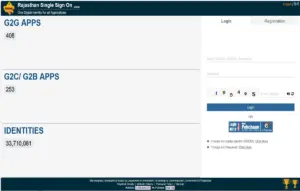 Fig 1: Recruitment Portal Icon
Agar aapke paas SSO ID pehle se nahi hai, to aapko pehle Registration tab par click karke naya SSO account banana hoga. SSO ID banane ke liye aap Bhamashah ID, JanAadhar, Google account, Facebook account, ya Aadhar ke through registration kar sakte hain. Agar aap already registered hain to seedha login hi karein.
Tip: Agar aap apni Digital Identity ya Password bhool gaye hain, to login page par hi “Forgot Digital Identity” aur “Forgot Password” ka option diya gaya hai. Usse click karke aap OTP ke through apni ID/password recover kar sakte hain.
Step 2: Recruitment Portal Par Jaana
Login karne ke baad, aapke saamne SSO ka dashboard khulega jisme bahut saare apps ke icons dikhenge – ye apps G2G, G2C aur G2B categories me divide hote hain.
Aapko G2C (Government to Citizen) category ke andar Recruitment Portal ka icon dhundhna hai aur usspar click karna hai.
 Fig 2: Recruitment Portal Icon
Agar aapko ye icon dashboard par nahi dikh raha, to aap upar diye gaye search box me “Recruitment Portal” type karke bhi search kar sakte hain. Click karte hi aap Recruitment Portal ke home page par redirect ho jayenge.
Step 3: Rajasthan OTR registration ke liye Recruitment Portal Ka Dashboard Samajhna
Recruitment Portal khulne ke baad aapko ek naya dashboard dikhega jisme teen main sections honge:
- My Applications – Yaha aapki previous ki gayi applications dikhengi
- Notifications – Naye updates aur notifications yaha aayenge
- Ongoing Recruitment – Currently chal rahi bhartiyo ki list yaha dikhegi
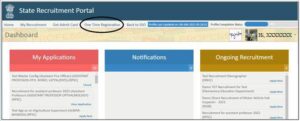 Fig 3: Recruitment Portal (Home)
Agar aapne abhi tak apna OTR profile create nahi kiya hai, to aapko yaha do options milte hain:
- Rajasthan OTR registration button par direct click karke registration process shuru karein
- Ya phir Ongoing Recruitment section me se kisi bhi bharti ke saamne diye gaye Apply Now button par click karein – agar aapka OTR complete nahi hai, to system automatically aapko OTR page par le jayega
Dono tarike se end result same hai – aapko OTR complete karna hi padega tabhi aap application form bhar payenge.
Step 4: “Apply Now” Button Par Click Karne Ke Baad Ka Pop-Up
Jab aap kisi bhi recruitment ke saamne diya gaya Apply Now button dabate hain (aur aapka OTR number abhi generate nahi hua hai), to ek pop-up message screen par aata hai:
“Please update details on Rajasthan OTR registration page of recruitment portal profile”
Aapko is message ko padhne ke baad Okay button par click karke aage badhna hai.
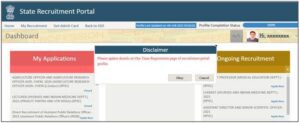 Fig 4: Pop Up Message
Important Note: Ye pop-up sirf un candidates ko dikhta hai jinka Rajasthan OTR registration Number abhi tak generate nahi hua hai. Ek baar jab aapka OTR number ban jata hai, uske baad jab bhi aap Apply Now dabayenge, aap seedha Basic Details page par redirect ho jayenge – ye pop-up dobara nahi aayega.
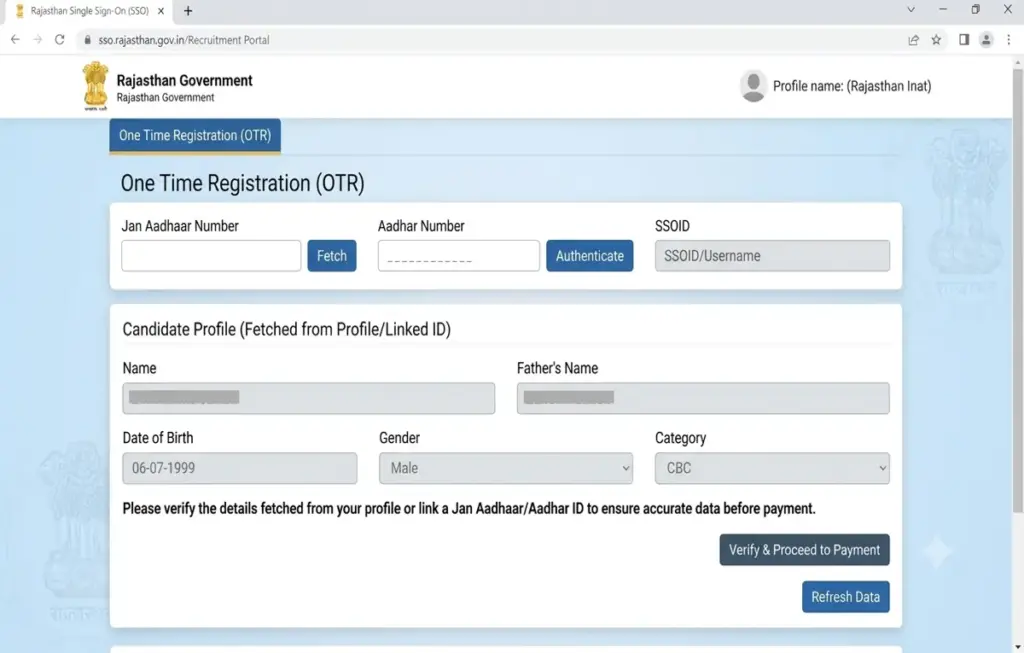
Step 5: Rajasthan OTR registration Form Shuru Karna
Ab jo sabse important screen aati hai wo hai Rajasthan OTR registration ka form. Yaha sabse pehla aur sabse important question puchha jata hai:
“Are you a Rajasthan Resident Candidate?” (Kya aap Rajasthan ke niwasi hain?)
Iska jawab aapko Yes ya No me dena hota hai. Is jawab ke basis par pura form aage ka process alag-alag chalta hai. Chaliye dono cases ko detail me samajhte hain.
Case 1: Agar Aapne “Yes” Select Kiya (Aap Rajasthan Resident Hain)
Agar aap Rajasthan ke resident hain aur aapne Yes select kiya, to yaha aage 3 sub-cases banti hain, jo depend karti hain ki aapke paas JanAadhar hai, sirf Aadhar hai, ya dono nahi hai.
Case 1.1: JanAadhar / Acknowledgement ID Wale Candidates
Agar aapke paas JanAadhar Card ya Acknowledgement ID hai, to Yes select karte hi neeche diya gaya form khul jayega jisme aapko apni JanAadhar/Acknowledgement ID enter karni hogi.
Process is tarah hoga:
- JanAadhar/Acknowledgement ID daalein
- Fetch Member button par click karein
- Ek pop-up khulega jisme us JanAadhar card se linked sabhi family members ki list dikhegi
- Jis member ke naam se aap OTR banana chahte hain, us member ko select karein
- Send OTP button dabayein
- OTP verify hote hi candidate ka naam, Date of Birth, Gender, Father’s Name, Mobile Number aur Email ID (agar JanAadhar me update hai) automatically fetch ho jayenge
- Agar Email ID JanAadhar record me maujood nahi hai, to aapko manually email ID enter karke usse OTP se verify karna hoga
- Sabse aakhir me Verify OTR button par click karein
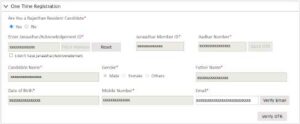 Fig 5: Candidates belongs to Rajasthan and have JanAadhar/Acknowledgement ID
Jab aap “Fetch Member” par click karte hain, to niche jaisa pop-up khulta hai jisme JanAadhar se linked members ki list, unka mobile number, member ID aur Aadhar ID dikhta hai. Yahan aapko sahi member select karke Apply button dabana hota hai.
 Fig 6: Pop Up – Select Member from JanAadhar Details
Dhyan rahe: JanAadhar se related sabhi family members ki details is popup me dikhti hain, isliye sahi member select karna bahut zaroori hai kyunki ek baar OTR generate hone ke baad naam, date of birth, gender jaisi details edit nahi ho payengi.
Case 1.2: Aadhar Card Wale Candidates (Jinke Paas JanAadhar Nahi Hai)
Agar aapke paas JanAadhar/Acknowledgement ID nahi hai lekin Aadhar Card hai, to aapko pehle “I don’t have JanAadhar/Acknowledgement I.D” wale checkbox par tick karna hoga.
Aisa karte hi ek naya form khul jayega jisme:
- Aadhar Number enter karein
- Send OTP button par click karein
- OTP verify hote hi candidate ka naam, Date of Birth, Gender aur Father’s Name (agar available ho) Aadhar record se fetch ho jayenge
- Mobile Number aur Email ID manually enter karein
- Email ID ko OTP ke through verify karein
- Verify OTR button par click karein
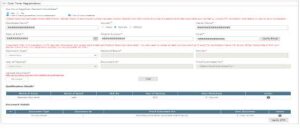 Fig 7: Candidates belongs to Rajasthan and have Aadhar ID
Important: Verify OTR button dabane se pehle Email verification zaroor complete kar lein, warna system aapko aage nahi badhne dega.
Case 1.3: Na JanAadhar Hai Na Aadhar (Only SSO Profile Se Details)
Ye wo case hai jab candidate Rajasthan ka resident to hai, lekin uske paas na JanAadhar hai na Aadhar Card. Aise case me candidate ko dono checkboxes tick karne honge:
- “I don’t have JanAadhar/Acknowledgement”
- “I don’t have Aadhar”
Dono checkbox select karte hi ek form khulega jisme candidate ka naam, Date of Birth, Gender, Mobile Number aur Email ID (agar SSO profile me available hai) automatically fetch ho jayenge SSO profile se.
Ab candidate ko manually ye steps follow karne honge:
- Father’s Name fill karein
- Email ID ko OTP verification ke through verify karein
- Supporting documents upload karein:
- Secondary (10th) ya equivalent Certificate (compulsory)
- Inme se koi ek ID Proof: Aadhar Card, PAN Card, Driving License, ya Voter ID
- Documents upload karne ke baad Verify OTR button dabayein
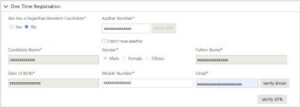 Fig 8: Candidates belongs to Rajasthan and don’t have Janaadhar ID and Aadhar ID
Bahut Zaroori Baat: Ek baar jab aap ye details submit kar dete hain aur mobile OTP se verify ho jaati hain, to ye details future me edit nahi ki ja sakti. Isliye document upload karte waqt aur details bharte waqt bahut dhyan rakhein, especially:
- Candidate Name
- Date of Birth
- Gender
- Father’s Name
Ye sab OTR verification ke baad non-editable ho jaate hain.
Case 2: Agar Aapne “No” Select Kiya (Aap Rajasthan Resident Nahi Hain)
Agar aap Rajasthan ke resident nahi hain aur aapne No select kiya, to yaha 2 sub-cases banti hain.
Case 2.1: Aadhar Card Wale Candidates (Non-Resident)
Agar aapke paas Aadhar Card hai, to No select karte hi form khulega jisme:
- Aadhar Number enter karein
- Send OTP button dabayein
- OTP verify hote hi naam, Date of Birth, Gender aur Father’s Name (agar available ho) Aadhar se fetch ho jayenge
- Mobile Number aur Email ID manually enter karein
- Email ko OTP se verify karein
- Verify OTR button par click karein
Fig 9: Candidates not belongs to Rajasthan and have Aadhar ID
Case 2.2: Aadhar Card Nahi Hai (Non-Resident)
Agar candidate ke paas Aadhar Card nahi hai, to “I don’t have Aadhar” checkbox tick karna hoga. Aisa karte hi candidate ka naam, Date of Birth, Gender, Mobile Number aur Email ID (agar SSO profile me available hai) automatically fetch ho jayenge.
Iske baad candidate ko:
- Father’s Name manually fill karna hoga
- Email ID OTP se verify karni hogi
- Documents upload karne honge:
- Secondary ya equivalent Certificate
- Ek ID Proof (Aadhar, PAN, Driving License, ya Voter ID)
- Verify OTR button dabana hoga
Fig 10: Candidates not belongs to Rajasthan and don’t have Aadhar ID
Yaha bhi wahi rule apply hota hai – ek baar submit aur OTP verify hone ke baad details edit nahi ho sakti.
Step 6: Verify OTR – First Pop-Up (Confirmation Screen)
Upar diye gaye kisi bhi case me, jab aap sabhi details fill karke Verify OTR button dabate hain, to sabse pehle ek confirmation pop-up khulta hai. Isme aapki fetched/filled details dobara dikhayi jaati hain:
- Candidate Name
- Father’s Name
- Gender
- Date of Birth
Saath hi ek warning message bhi diya hota hai:
“Please note that above mentioned details will be non-editable in Rajasthan OTR registration/Application Form after OTP verification”
Agar sab details sahi hain to Final Submit button dabayein, agar kuch galat hai to Cancel karke details edit kar sakte hain (OTP verification se pehle tak).
Fig 11: First Pop Up
Suggestion: Is screen par ruk kar ek baar dobara sabhi details ko carefully check karein. Chhoti si spelling mistake ya galat date of birth aapko future me bahut problem de sakti hai kyunki ye field permanently lock ho jaayegi.
Step 7: Mobile OTP Verification – Second Pop-Up
Final Submit dabate hi doosra pop-up khulta hai jisme aapke registered mobile number (masked format me, jaise XXXXXXX988) par ek OTP bheja jata hai.
Yaha aapko:
- Received OTP enter karna hai
- Verify OTP button par click karna hai
- Agar OTP nahi mila, to Resend OTP button use kar sakte hain
- Agar process cancel karna hai to Cancel button dabayein
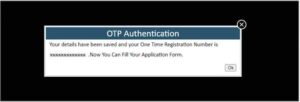 Fig 12: Second Pop Up
Tip: OTP generally kuch second me hi aa jata hai. Agar 1-2 minute tak OTP na aaye to Resend OTP ka option use karein. Network issue ya mobile signal weak hone par bhi OTP delay ho sakta hai.
Step 8: Rajasthan OTR registration Number Milna
Jaise hi OTP successfully verify ho jata hai, ek final pop-up screen par aata hai jisme likha hota hai:
“Your details have been saved and your Rajasthan OTR registration Number is [XXXXXXXXXXXX]. Now You Can Fill Your Application Form.”
 Fig 13: Rajasthan OTR registration Number
Bahut Important: Is OTR number ko kahin safe jagah note kar lein – ho sake to screenshot le lein ya kisi diary/notepad me likh lein. Ye number aapka permanent identification number rahega Rajasthan Recruitment Portal ke liye, aur is number ke through hi aap future me kisi bhi bharti ke liye apply kar payenge.
Ye number aapke SSO ID login me bhi hamesha available rahega, isliye agar aap notepad me likhna bhool bhi jaate hain, to SSO login karke Recruitment Portal me wapas dekh sakte hain.
Duplicate Profile Case: Jab Same Details Se Doosri SSO ID Try Kare
Ek interesting aur important situation ye hai – agar koi candidate apni same details (jaise naam, date of birth, Aadhar/JanAadhar) se doosri SSO ID ke through profile banane ki koshish karta hai, to system automatically detect kar leta hai ki ye details pehle se kisi aur SSO ID ke saath registered hain.
Aise case me OTP verification ke baad ye screen aati hai:
“Please note that profile with same details already exists in the Recruitment System with SSO id [existing SSO ID] so filling this application form will be treated as provisional only and this will be verified by concerned department in due course…”
Saath me ek checkbox bhi diya hota hai:
“I certify that the earlier shown SSO Id where profile already exist with given details are not belongs to me and if found it is of mine only the concerned department may reject my candidature.”
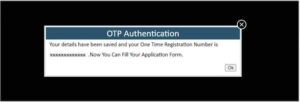 Fig 14: Rajasthan OTR registration Number (Duplicate Profile)
Ab yaha candidate ke paas 2 options hote hain:
Agar aap sach me alag candidate hain (aur wo dikhaya gaya SSO ID kisi aur ka hai): Checkbox tick karke OK button dabayein. Is se aapka naya OTR number generate ho jayega. Lekin dhyan rahe, ye application “provisional” mani jayegi aur concerned department dwara verify ki jayegi. Agar verification me galat paya gaya, to aapki candidature reject bhi ho sakti hai.
Agar wo profile actually aapki hi hai (pehle kisi aur SSO ID se bana tha): Aise case me Cancel button dabayein aur us dikhaye gaye SSO ID se login karein, kyunki uss ID me aapka OTR number already generate ho chuka hai.
Agar aap Option 1 choose karte hain aur OK dabate hain, to fir se OTR number generate hone ka confirmation pop-up aayega:
Fig 15: Rajasthan OTR registration Number (After Duplicate Confirmation)
Safety Tip: Hamesha koshish karein ki apna ek hi SSO ID use karein aur usi se sabhi applications submit karein. Multiple SSO ID banane se duplicate profile ka issue aata hai jo aapki candidature risk me daal sakta hai.
OTR Ke Baad Application Form Bharna
Ek baar jab aapka OTR number generate ho jata hai, to uske baad application form bharna bahut simple ho jata hai. Jo bhi details aapne OTR ke time fill ki thi (jo Recruitment Portal profile me store hoti hain), wo automatically har naye application form me pre-filled aa jayengi.
Isse aapko har bharti ke liye baar-baar:
- Naam, Date of Birth, Gender, Father’s Name
- Contact details
- Category/Documents details
dobara bharne ki zaroorat nahi padegi. Aapko sirf:
- Us specific bharti ke liye required additional details (jaise educational qualification, category certificate, experience details) fill karni hogi
- Application fee pay karni hogi
- Final submit karna hoga
Isse pura process bahut fast ho jata hai, especially un candidates ke liye jo saal me multiple bhartiyo ke liye apply karte hain.
OTR Process Ka Complete Summary (Table Form Me)
Neeche diye gaye table se aap poore process ko ek nazar me samajh sakte hain:
| Step | Kya Karna Hai |
|---|---|
| 1 | sso.rajasthan.gov.in/signin par SSO ID se login karein |
| 2 | G2C category me Recruitment Portal open karein |
| 3 | Dashboard par Rajasthan OTR registration ya Apply Now click karein |
| 4 | Pop-up message par Okay click karein |
| 5 | “Are you Rajasthan Resident?” ka jawab dein – Yes/No |
| 6 | Apne case ke hisaab se JanAadhar/Aadhar/Manual details bharein |
| 7 | Documents upload karein (agar required ho) |
| 8 | Verify OTR button dabayein |
| 9 | First pop-up me details confirm karein – Final Submit |
| 10 | Mobile OTP enter karke verify karein |
| 11 | OTR Number note kar lein |
| 12 | Application form bharke fee submit karein |
OTR Registration Ke Liye Zaroori Documents Ki List
Aapke case ke hisaab se alag-alag documents ki zaroorat padti hai:
Agar JanAadhar hai: Sirf JanAadhar/Acknowledgement ID chahiye, koi document upload nahi karna.
Agar sirf Aadhar hai: Sirf Aadhar Number chahiye, koi document upload nahi karna.
Agar JanAadhar aur Aadhar dono nahi hai (Resident ya Non-Resident dono ke liye): – Secondary (10th) ya equivalent Certificate (Compulsory) – Inme se koi ek ID Proof: – Aadhar Card – PAN Card – Driving License – Voter ID Card
Common Problems Aur Unke Solutions (Troubleshooting)
Problem 1: OTP Nahi Aa Raha
Solution: Apna mobile network check karein, kuch minute wait karein, aur “Resend OTP” button use karein. Agar phir bhi na aaye, to check karein ki aapka mobile number Aadhar/JanAadhar se sahi tarike se linked hai ya nahi.
Problem 2: Email ID Verify Nahi Ho Rahi
Solution: Email ID sahi type ki hai ya nahi dobara check karein. Spam/junk folder me OTP email check karein. Kabhi kabhi email delivery me thoda time lag sakta hai.
Problem 3: Details Galat Ho Gayi Hain Aur OTP Verify Bhi Ho Gaya Hai
Solution: Jaisa upar bataya gaya, OTP verification ke baad Name, DOB, Gender, Father’s Name jaisi fields edit nahi hoti. Aise case me aapko concerned department/helpdesk se contact karna hoga correction ke liye.
Problem 4: “Duplicate Profile” Ka Message Aa Raha Hai
Solution: Pehle confirm karein ki dikhaya gaya SSO ID aapka hi hai ya kisi aur ka. Agar aapka hai to usi SSO ID se login karein. Agar nahi hai, to checkbox tick karke provisional registration ke saath aage badhein, lekin dhyan rahe ye baad me verify hogi.
Problem 5: Fetch Member Button Kaam Nahi Kar Raha
Solution: JanAadhar/Acknowledgement ID sahi se enter ki hai ya nahi check karein. Internet connection stable rakhein aur page ko refresh karke dobara try karein.
Problem 6: Documents Upload Nahi Ho Rahe
Solution: File size aur format check karein (generally PDF/JPG format aur size limit prescribed hoti hai portal par). File ka size bahut zyada hone par upload fail ho sakta hai, isliye compress karke try karein.
OTR Registration Se Related Zaroori Tips
Sahi Information Bharein: Kyunki verification ke baad details lock ho jaati hain, isliye har field ko dhyan se check karke hi Final Submit karein.
Ek Hi SSO ID Use Karein: Multiple SSO ID banane se bachein, isse duplicate profile ka risk kam hota hai.
OTR Number Safe Rakhein: Screenshot lein ya diary me likh lein, ye number future me bahut kaam aayega.
Documents Ready Rakhein: Agar aapke paas JanAadhar/Aadhar nahi hai, to pehle se Secondary Certificate aur ID Proof scan/photo karke ready rakhein.
Mobile Number Active Rakhein: OTP verification ke liye jo mobile number use kar rahe hain, wo active aur aapke paas accessible hona chahiye.
Email ID Bhi Check Karte Rahein: Recruitment se related important notifications email par bhi aa sakte hain.
Application Deadline Se Pehle OTR Complete Karein: Last moment me rush karne se bachne ke liye OTR process pehle hi complete kar lein, taaki jab bharti aaye to sirf application form bharna pade.
Rajasthan SSO OTR Se Judi FAQs (Frequently Asked Questions)
Q1. Rajasthan OTR registration kya hota hai?Rajasthan OTR registration ek aisa process hai jisme candidate apni basic details (naam, DOB, gender, father’s name, contact details) ek baar Recruitment Portal par register karta hai, jisse future me sabhi bhartiyo ke liye application form bharna aasan ho jata hai.
Q2. OTR karne ke liye SSO ID hona zaroori hai kya? Haan, OTR sirf tabhi ho sakta hai jab aap Rajasthan SSO ID se login karke Recruitment Portal open karte hain. Agar aapke paas SSO ID nahi hai to pehle SSO par registration karna hoga.
Q3. Kya OTR ke liye JanAadhar zaroori hai? Nahi. Agar aapke paas JanAadhar nahi hai to aap Aadhar Card se bhi OTR kar sakte hain. Agar dono nahi hain, to aap manually SSO profile ki details ke saath, Secondary Certificate aur ek ID proof upload karke bhi OTR complete kar sakte hain.
Q4. Agar main Rajasthan ka resident nahi hoon, to kya main OTR kar sakta hoon? Haan bilkul. “Are you Rajasthan Resident Candidate” question me aap “No” select kar sakte hain aur uske baad Aadhar ya bina Aadhar ke bhi OTR complete kar sakte hain.
Q5. OTR Number kaise mil jata hai? Jab aap saari details fill karke Verify OTR button dabate hain, uske baad confirmation pop-up aur mobile OTP verification hoti hai. OTP verify hone ke baad system aapko ek unique Rajasthan OTR registration Number provide karta hai.
Q6. Kya OTR ke baad details edit ki ja sakti hain? Nahi. Ek baar mobile OTP se verify hone ke baad Name, Date of Birth, Gender, aur Father’s Name jaisi details permanently lock ho jaati hain aur inhe edit nahi kiya ja sakta.
Q7. Agar meri details galat ho gayi hain to kya karu? Aapko concerned recruitment department ya Rajasthan SSO helpdesk se contact karna hoga correction request ke liye, kyunki system khud se edit ki permission nahi deta.
Q8. Duplicate Profile ka message kyun aata hai? Ye message tab aata hai jab koi candidate same personal details (jaise Aadhar number ya JanAadhar linked details) ke saath doosri SSO ID se profile banane ki koshish karta hai. System pehle se registered profile ko detect kar leta hai.
Q9. OTR ke liye kaunse documents chahiye hote hain? Agar JanAadhar ya Aadhar hai, to koi extra document nahi chahiye. Agar dono nahi hain, to Secondary (10th) Certificate aur ek ID Proof (Aadhar/PAN/Driving License/Voter ID) upload karna hota hai.
Q10. Kya OTR ek baar hi karna padta hai? Haan, jaisa naam se hi pata chalta hai, OTR sirf ek baar karna padta hai. Uske baad wahi OTR Number use karke aap kisi bhi bharti ke liye apply kar sakte hain.
Q11. Mobile OTP nahi aa raha, kya karu? Network signal check karein, kuch der wait karein aur “Resend OTP” option use karein. Agar phir bhi problem ho to apna mobile number Aadhar/JanAadhar record me check karayein ki wo sahi hai ya nahi.
Q12. Kya OTR karne ke liye koi fee lagti hai? Nahi, Rajasthan OTR registration process bilkul free hai. Fee sirf specific recruitment ke application form bharte waqt lagti hai.
Q13. Recruitment Portal kaha milega SSO dashboard par? Recruitment Portal, SSO dashboard ki G2C (Government to Citizen) category me milta hai. Aap search box me “Recruitment Portal” search karke bhi dhundh sakte hain.
Q14. OTR Number bhool jaane par kaise pata karein? Aap apni SSO ID se login karke Recruitment Portal open karein – wahan aapka OTR Number automatically dikh jayega, kyunki wo aapke profile se linked rehta hai.
Q15. Kya OTR alag alag departments (RPSC, RSSB) ke liye alag alag banana padta hai? Nahi, ek hi OTR Number se aap RPSC, RSSB ya kisi bhi doosre Rajasthan government department ki recruitment ke liye apply kar sakte hain.
Q16. Verify OTR button dabane ke baad kya hota hai? Sabse pehle ek confirmation pop-up khulta hai jisme details dobara dikhayi jaati hain, uske baad Final Submit karne par mobile OTP verification hoti hai, aur OTP verify hote hi OTR Number generate ho jata hai.
Q17. Kya family ke multiple members apne apne OTR bana sakte hain? Haan, agar aap JanAadhar se OTR bana rahe hain aur JanAadhar me multiple family members linked hain, to “Fetch Member” popup se har member alag alag apna OTR bana sakta hai, bas har member ko apni SSO ID se login karke apna registration karna hoga.
Q18. Agar main galti se apna hi purana profile duplicate SSO ID se bana raha hoon to kya karu? System khud detect kar lega aur aapko warning dega. Aapko us case me “Cancel” karke apni purani SSO ID se login karna chahiye jisme aapka original OTR Number already generate hai.
Q19. Kya Email verification sabhi cases me zaroori hai? Haan, chahe aap JanAadhar se registration kar rahe hain ya Aadhar se ya manually – agar Email ID system me pehle se verified nahi hai, to OTP ke through use verify karna hi hoga Verify OTR button dabane se pehle.
Q20. Application form bharte waqt kya OTR ki details phir se bharni padti hain? Nahi, OTR complete hone ke baad jab bhi aap koi bharti ka application form bharenge, aapki basic details (jo Recruitment Portal profile me save hain) automatically pre-fill ho jayengi. Aapko sirf us specific bharti ke liye additional details aur fee submit karni hogi.
Conclusion
Rajasthan SSO par Rajasthan OTR registration process thoda detailed zaroor hai, lekin ek baar samajh lene ke baad ye bahut hi simple aur time-saving process ban jata hai. Chahe aap Rajasthan resident ho ya nahi, chahe aapke paas JanAadhar ho, Aadhar ho ya dono na ho – is guide me diye gaye har case ko follow karke aap easily apna OTR complete kar sakte hain.
Sabse zaroori baat yaad rakhein – details bharte waqt bahut dhyan se kaam karein kyunki OTP verification ke baad Name, Date of Birth, Gender aur Father’s Name jaisi details permanently lock ho jaati hain. Ek baar OTR Number mil jaane ke baad, aap Rajasthan ki kisi bhi sarkari bharti – RPSC ho ya RSSB – ke liye seedha application form bhar sakte hain, bina baar baar apni basic details fill kiye.
Agar aapko is process me kahin bhi problem aati hai, to upar diye gaye troubleshooting section aur FAQs zaroor check karein, aur zaroorat pade to Rajasthan SSO ke official helpdesk se contact karein.
Best of luck aapki Rajasthan sarkari naukri ki tayari ke liye!
Disclaimer: Ye article sirf informational purpose ke liye hai, jo official Rajasthan SSO “Help Document for Rajasthan OTR registration” par based hai. Latest updates aur official process ke liye hamesha official website sso.rajasthan.gov.in ko refer karein.
Rajasthan SSO Portal Ka Itihaas Aur Mahatva (Background)
Rajasthan Government ne apne citizens ko digital services ek hi platform par dene ke liye SSO (Single Sign On) portal launch kiya tha. Is se pehle har department ki alag website hoti thi, alag login credentials hote the, aur candidates ko har jagah apni details baar baar submit karni padti thi. SSO portal aane ke baad ye sab centralize ho gaya.
Aaj SSO portal ke through Rajasthan ke citizens 300 se zyada G2G, G2C aur G2B services access kar sakte hain – jisme bijli bill payment, ration card services, education department services, employment exchange, aur sabse important – Recruitment Portal shamil hai.
Recruitment Portal specifically un candidates ke liye banaya gaya hai jo Rajasthan Government ki various bhartiyo me apply karna chahte hain. Isse pehle candidates ko RPSC, RSSB aur alag alag departments ki websites par jaakar alag alag account banane padte the. Ab sab kuch ek hi jagah – SSO ID ke through – ho jata hai.
SSO Portal Ke Fayde
- Single Login: Ek hi ID-password se saari services access.
- Time Saving: Baar baar registration karne ki zaroorat nahi.
- Data Security: Aapki personal information encrypted aur secure rehti hai.
- Transparency: Application status, notifications, sab kuch real time track ho sakta hai.
- Paperless Process: Zyadatar documents digitally verify ho jaate hain (Aadhar/JanAadhar ke through), isliye physical documents submit karne ki zaroorat kam padti hai.
RPSC Aur RSSB Kya Hai? (Recruitment Bodies Overview)
Jab hum Rajasthan Recruitment Portal ki baat karte hain, to do naam sabse zyada suna jaata hai – RPSC aur RSSB. Chaliye inhe thoda samajh lete hain.
RPSC (Rajasthan Public Service Commission)
RPSC Rajasthan ki sabse prestigious recruitment body hai jo Gazetted aur higher-level posts ke liye bharti karti hai – jaise RAS (Rajasthan Administrative Service), Assistant Professor, Medical Officer, aur anya senior level government posts. RPSC ki bhartiyo ke liye bhi candidate ko sabse pehle OTR complete karna zaroori hota hai.
RSSB (Rajasthan Staff Selection Board / Rajasthan Subordinate and Ministerial Services Selection Board)
RSSB, Non-Gazetted aur subordinate level posts ke liye bharti conduct karta hai – jaise Patwari, LDC (Lower Division Clerk), Constable, Stenographer, VDO (Village Development Officer), aur anya similar posts. RSSB ki bhartiyo ke liye bhi wahi ek OTR Number kaam aata hai jo aapne ek baar generate kiya tha.
Isliye chahe aap RPSC ki bharti apply karna chahte ho ya RSSB ki, ya kisi doosre department (jaise Education Department, Health Department) ki – sabke liye same OTR process follow hota hai, aur ek hi OTR Number sabke liye valid rehta hai.
OTR Registration Se Pehle Ki Taiyari (Pre-Registration Checklist)
OTR process start karne se pehle, agar aap kuch cheezein pehle se ready rakhenge to process bahut smooth ho jayega. Neeche ek complete checklist di gayi hai:
Documents Checklist
Information Checklist
Ye sab pehle se ready rakhne se aapko form bharte waqt beech me ruk kar dhundhne ki zaroorat nahi padegi, aur process kaafi fast ho jayega.
OTR Registration Me Lagne Wala Time
Agar aapke paas JanAadhar ya Aadhar Card hai aur mobile number bhi update hai, to poora OTR process 5 se 10 minute me complete ho jata hai. Agar aap manual process follow kar rahe hain (bina JanAadhar/Aadhar ke), to documents upload karne ki wajah se ismein 15 se 20 minute tak lag sakte hain, depending on internet speed aur document ready hone par.
JanAadhar Vs Aadhar Vs Manual Registration – Kaunsa Better Hai?
Kai candidates ye confusion me rehte hain ki kaunsa method sabse better aur fastest hai. Neeche ek comparison diya gaya hai:
| Criteria | JanAadhar Se | Aadhar Se | Manual (SSO Profile) |
|---|---|---|---|
| Speed | Sabse fast | Fast | Thoda time lagta hai |
| Document Upload Zaroori? | Nahi | Nahi | Haan |
| Family Members Auto-Fetch? | Haan | Nahi | Nahi |
| Data Accuracy | High (Govt verified) | High (Govt verified) | Depends on user input |
| Best For | Rajasthan Residents | Jinke paas sirf Aadhar hai | Jinke paas dono nahi hain |
Recommendation: Agar aapke paas JanAadhar hai, to usi se registration karna sabse convenient rahega kyunki details automatically fetch ho jaati hain aur error ka chance kam hota hai.
Application Form Bharte Waqt Dhyan Rakhne Wali Baatein
Jab aap OTR complete karke kisi specific recruitment ka application form bharte hain, to neeche di gayi baaton ka dhyan zaroor rakhein:
Category Certificate: Agar aap Reserved category (SC/ST/OBC/EWS) se belong karte hain, to valid category certificate scan karke ready rakhein.
Educational Qualification Documents: Jis post ke liye apply kar rahe hain, uske eligibility criteria ke according apni marksheets aur certificates ready rakhein.
Photograph aur Signature: Zyadatar forms me recent passport size photo aur signature ki scanned copy specified format (JPG/PNG) aur size limit ke andar upload karni padti hai.
Application Fee: Fee category-wise alag hoti hai (General/OBC/SC/ST/EWS/PH). Payment online mode se hi hoti hai – net banking, debit/credit card, ya UPI.
Application Number: Har application submit hone ke baad ek unique Application Number milta hai – use bhi safe rakhein, kyunki admit card download karte waqt ye kaam aata hai.
Last Date Se Pehle Submit Karein: Last minute rush se bachne ke liye deadline se kam se kam 1-2 din pehle application submit kar dein.
Rajasthan Sarkari Naukri Ke Liye OTR Kyun Zaroori Hai – Detailed Analysis
Bahut se candidates soch sakte hain ki ye extra step (OTR) kyun banaya gaya hai, jab pehle directly application form bhar sakte the. Iske peeche kuch important reasons hain:
1. Duplicate Applications Rokna
Pehle ke system me ek hi candidate multiple baar, alag alag details ke saath, ek hi bharti ke liye apply kar sakta tha. OTR system se ye ensure hota hai ki har candidate ka ek unique, verified identity ho jisse duplicate ya fraudulent applications ki sambhavna kam ho jaati hai.
2. Data Verification Aasan Hona
Jab details JanAadhar ya Aadhar se directly fetch hoti hain, to Government ke paas verified data hota hai, jisse manual verification ka burden kam ho jata hai aur selection process fast ho jata hai.
3. Candidate Ka Time Bachana
Ek baar OTR ho jaane ke baad, candidate ko har naye application form me apni basic details baar baar type nahi karni padti. Isse especially un candidates ko fayda hota hai jo saal bhar me multiple exams ke liye apply karte hain.
4. Digital India Initiative Ko Support Karna
Ye system Government ke Digital India mission ke according hai, jisme paperless aur seamless online processes ko promote kiya ja raha hai.
5. Real-Time Data Update
Agar candidate ki koi details change hoti hain (jaise mobile number, address), to OTR profile update karke wo changes automatically future ke saare applications me reflect ho jaate hain (jahan tak edit allowed hai).
Mobile OTP Verification Process – Kyun Zaroori Hai
Mobile OTP verification is process ka sabse critical security step hai. Iski wajah se:
- Ye confirm hota hai ki jo mobile number diya gaya hai wo actually candidate ke paas accessible hai
- Fraud ya fake registration ki sambhavna kam ho jaati hai
- Future me OTP-based login/verification (jaise password reset) is mobile number se possible ho jata hai
- Important notifications (exam date, admit card release, result) sabse pehle isi number par SMS ke through bheji jaati hain
Isliye jo mobile number aap OTR ke time register karte hain, wo hamesha apne paas active rakhein aur number change hone par jald se jald SSO profile me update karein.
Email Verification Ki Zaroorat
Mobile OTP ki tarah Email verification bhi utna hi important hai. Email ID par:
- Application confirmation
- Payment receipt
- Important circulars aur updates
- Password recovery links
bheje jaate hain. Isliye ek aisi email ID use karein jo aap regularly check karte hain, aur uska password bhi remember rakhein.
Extended FAQs – OTR Aur Recruitment Portal Se Judi Aur Bhi Sawal Jawab
Q21. Kya student SSO ID se OTR kar sakta hai jo abhi college me hai? Haan, koi bhi eligible candidate jiske paas valid SSO ID hai, wo OTR complete kar sakta hai, chahe wo abhi student ho ya job kar raha ho.
Q22. Agar meri Date of Birth Aadhar aur 10th certificate me alag hai to kya hoga? Aisi situation me aapko pehle apne documents me correction karana chahiye (Aadhar ya certificate, jo bhi galat ho), taaki future me selection process me discrepancy ka issue na aaye.
Q23. Kya main apna mobile number OTR complete hone ke baad change kar sakta hoon? Kuch fields (jaise mobile number, email, address) generally update ki ja sakti hain profile section se, lekin core identity details (naam, DOB, gender, father’s name) lock rehti hain. Exact update policy ke liye SSO helpdesk se confirm karein.
Q24. JanAadhar Card kaise banaye agar mere paas nahi hai? JanAadhar Card banane ke liye aap nazdiki e-Mitra kiosk ya SSO portal ki JanAadhar enrollment service ka use kar sakte hain. Ismein aapko apne parivar ki details register karni hoti hain.
Q25. Kya NRI (Non-Resident Indian) candidates bhi OTR kar sakte hain? Haan, “Are you Rajasthan Resident Candidate” me “No” select karke, Aadhar ya manual method se non-resident candidates bhi OTR complete kar sakte hain, basharte wo eligibility criteria fulfil karte hon.
Q26. Application form aur OTR form me kya farak hai? OTR ek baar ki jaane wali basic profile registration hai jo saari future applications ke liye common details store karti hai. Application Form har specific recruitment ke liye alag se bhara jata hai, jisme us bharti se related additional details aur fee submit ki jaati hai.
Q27. Kya OTR Number expire ho sakta hai? Nahi, ek baar generate hone ke baad OTR Number permanently valid rehta hai. Ye expire nahi hota.
Q28. Agar main password bhool jaoon to OTR data safe rahega kya? Haan, aapka data SSO ID se linked hokar Government ke server par securely store hota hai. Password reset karne ke baad bhi aapka OTR data as it is rahega.
Q29. Kya ek se zyada candidates ek hi mobile number use kar sakte hain OTP ke liye? Technically possible hai (jaise family members same number use karte hain), lekin recommend kiya jata hai ki har candidate apna individual, unique mobile number use kare taaki confusion aur notification miss hone se bacha ja sake.
Q30. Kya OTR complete karne ke baad koi confirmation email/SMS aata hai? Haan, generally OTR successful hone ke baad ek confirmation SMS/Email bheja jata hai jisme OTR Number mention hota hai.
Glossary – Important Terms Jo Is Process Me Use Hote Hain
- SSO (Single Sign On): Ek unified login system jisse Rajasthan Government ki multiple services access ki ja sakti hain.
- OTR (One Time Registration): Ek baar hone wali basic profile registration jo Recruitment Portal par sabhi bhartiyo ke liye common hai.
- JanAadhar: Rajasthan Government ka family-based identity card jisme har family member ka unique ID hota hai.
- Acknowledgement ID: JanAadhar registration ke process me diya gaya temporary ID jab tak final JanAadhar card nahi ban jata.
- G2C: Government to Citizen services.
- G2G: Government to Government services.
- G2B: Government to Business services.
- RPSC: Rajasthan Public Service Commission.
- RSSB: Rajasthan Staff Selection Board / Rajasthan Subordinate and Ministerial Services Selection Board.
- OTP: One Time Password, jo verification ke liye mobile/email par bheja jata hai.
Rajasthan Recruitment Portal Par Milne Wali Bharti Ki Categories
Recruitment Portal ke through, candidates neeche di gayi tarah ki bhartiyo ke liye apply kar sakte hain:
- Teaching Posts: Assistant Professor, Lecturer, Teacher (Grade I, II, III)
- Administrative Posts: RAS, Tehsildar, Assistant Administrative Officer
- Technical Posts: Junior Engineer, Assistant Engineer, IT Specialist
- Medical Posts: Medical Officer, Nurse, Pharmacist
- Clerical Posts: LDC, Junior Assistant, Stenographer
- Police & Security Posts: Constable, Sub-Inspector
- Agriculture Related Posts: Agriculture Supervisor, Agriculture Officer
Har category ki apni eligibility criteria, exam pattern, aur selection process hoti hai, lekin sabke liye entry point same hai – Rajasthan OTR registration.
Conclusion (Extended)
Rajasthan SSO ka Rajasthan OTR registration system, state ki recruitment process ko simplify karne ke liye banaya gaya ek powerful tool hai. Is guide me humne cover kiya:
- SSO ID se login karna
- Recruitment Portal navigate karna
- JanAadhar, Aadhar, aur manual – teeno tarike se OTR complete karna
- Documents ki requirement
- OTP verification process
- Duplicate profile handling
- Application form bharne ka baad ka process
- Common problems aur unke solutions
- 30 se zyada FAQs
Ummeed hai ki ye detailed guide aapko Rajasthan SSO par apna Rajasthan OTR registration successfully complete karne me poori tarah madad karegi. Agar aap Rajasthan Government ki kisi bhi bharti ke liye seriously taiyari kar rahe hain, to aaj hi apna OTR complete kar lein, taaki jab bharti announce ho, aap turant apna application form bhar sakein bina kisi delay ke.
Rajasthan sarkari naukri ki taiyari me lage sabhi candidates ko hardik shubhkamnayein!
Ye article Rajasthan SSO ke official “Help Document for Rajasthan OTR registration” ke content par based hai aur sirf educational/informational purpose ke liye taiyar kiya gaya hai. Kripya latest aur official updates ke liye hamesha sso.rajasthan.gov.in website visit karein.
SSO ID Nahi Hai To Kaise Banaye – Complete Registration Guide
Agar aap pehli baar Rajasthan SSO use kar rahe hain aur aapke paas abhi tak SSO ID nahi hai, to OTR shuru karne se pehle aapko ye registration process complete karna hoga.
SSO ID Registration Ke Liye Available Options
Rajasthan SSO par aap neeche diye gaye tarikon se apna account bana sakte hain:
Jan Aadhar Ke Through: Agar aapke paas Rajasthan ka JanAadhar Card hai, to seedha JanAadhar Number aur uske saath registered mobile OTP se SSO ID create ho jaati hai.
Bhamashah ID Ke Through: Purane Bhamashah card holders bhi is option se registration kar sakte hain (kai jagah ye ab JanAadhar se replace ho chuka hai).
Google Account Ke Through: Agar aapke paas Gmail account hai, to Google Sign-in option se bhi turant SSO ID ban jaati hai.
Facebook Account Ke Through: Facebook login credentials se bhi registration possible hai.
Aadhar Card Ke Through: Direct Aadhar Number aur linked mobile OTP se bhi SSO account create kiya ja sakta hai.
SSO ID Registration Ke Steps
- sso.rajasthan.gov.in website par jaayein
- Registration tab par click karein
- Upar diye gaye options me se apna preferred method select karein (JanAadhar/Google/Facebook/Aadhar/Bhamashah)
- Required details fill karein aur OTP se verify karein
- Apni khud ki Username aur Password set karein
- Registration complete hone ke baad login karein
Ek baar SSO ID create ho jaaye, uske baad aap directly is guide ke Step 1 se OTR process follow kar sakte hain.
e-Mitra Kiosk Ka Role OTR Process Me
Bahut se candidates, especially rural areas ke, jinke paas computer ya smartphone ki achhi jaankari nahi hoti, wo apna OTR process nazdiki e-Mitra kiosk ke through bhi complete karva sakte hain. e-Mitra operators trained hote hain aur ek nominal service charge lekar candidates ki OTR registration, application form filling, aur fee payment jaisi services provide karte hain.
Agar aap khud se online process karne me comfortable nahi hain, to apne area ke authorized e-Mitra kiosk par jaakar apna JanAadhar/Aadhar aur mobile number leke ja sakte hain, aur wahan se apna OTR aasani se complete karva sakte hain.
JanAadhar Enrollment Kaise Kare (Agar Nahi Hai)
Agar aap Rajasthan ke resident hain lekin abhi tak aapka JanAadhar Card nahi bana hai, to ye process follow karein:
- Nazdiki e-Mitra kiosk ya JanAadhar Seva Kendra par jaayein
- Apne parivar ke sabhi members ki basic details aur ek valid ID proof (jaise Aadhar) submit karein
- Family ka ek Mukhiya (head) designate karein
- Application submit hone ke baad ek Acknowledgement ID/Receipt Number milta hai
- Ye Acknowledgement ID temporary use ki ja sakti hai jab tak final JanAadhar Card generate nahi ho jata
- Final JanAadhar Card generate hone me kuch din se lekar hafte tak ka time lag sakta hai
Important: Is guide me humne dekha ki OTR form me “JanAadhar/Acknowledgement ID” dono accept kiye jaate hain, isliye agar aapka final card abhi nahi bana hai, to bhi aap Acknowledgement ID se OTR complete kar sakte hain.
Aadhar Card Me Correction Kaise Karayein (Agar Details Galat Hain)
Kyunki OTR verification ke baad details lock ho jaati hain, isliye recommend kiya jata hai ki OTR karne se pehle apne Aadhar Card ki details achhi tarah check kar lein. Agar Aadhar Card me naam, date of birth, ya gender jaisi koi details galat hain, to:
- Nazdiki Aadhar Seva Kendra ya permanent Enrollment Center visit karein
- Online bhi UIDAI ki official website ke through self-service update portal se kuch corrections kiye ja sakte hain
- Correction ke liye supporting documents (jaise 10th certificate, birth certificate) saath le jaayein
- Update hone me kuch din ka time lag sakta hai
Aadhar correction complete hone ke baad hi OTR process shuru karein, taaki aapki final registered details bilkul sahi hon.
Common Mistakes Jo Candidates OTR Process Me Karte Hain
Neeche diye gaye kuch common mistakes hain jo candidates aksar karte hain aur jinse bachna chahiye:
Mistake 1: Jaldbaazi Me Details Verify Karna
Bahut se candidates confirmation pop-up (Fig 11) par aayi details ko dhyan se padhe bina hi “Final Submit” dabaa dete hain. Baad me galti pata chalne par edit karna possible nahi hota.
Mistake 2: Galat Mobile Number Register Karna
Kuch candidates apna purana ya kisi doosre ka mobile number use kar lete hain jo baad me unke paas accessible nahi rehta, jisse future me OTP receive karne me dikkat aati hai.
Mistake 3: Multiple SSO ID Banana
Kai candidates confusion me ek se zyada SSO ID bana lete hain, jisse duplicate profile ka warning aata hai aur unki application “provisional” categorize ho jaati hai.
Mistake 4: Documents Ka Wrong Format Upload Karna
Agar manual method use kar rahe hain, to document upload karte waqt specified file format (generally PDF/JPG) aur size limit ka dhyan na rakhna common mistake hai jisse upload fail ho jata hai.
Mistake 5: Email Verification Skip Karne Ki Koshish
Kuch candidates Email verification complete kiye bina “Verify OTR” button dabane ki koshish karte hain, jo system allow nahi karta. Isse unnecessary confusion hoti hai.
Mistake 6: JanAadhar Me Galat Member Select Karna
Jab family ke multiple members JanAadhar se linked hote hain, to “Fetch Member” popup me galat member select kar lena bhi ek common mistake hai, jisse galat candidate ki details OTR me register ho jaati hain.
OTR Registration Ke Baad Profile Update Karna
Ek baar OTR complete hone ke baad, kuch details aap apni profile se update kar sakte hain (subject to system policy), jaise:
- Correspondence Address
- Permanent Address
- Alternate Contact Number (agar system allow kare)
- Educational Qualification (naye qualification add karna, jab tak core registered qualification na badle)
Lekin core identity details – Name, Date of Birth, Gender, aur Father’s Name – generally permanently locked rehti hain OTP verification ke baad, jaisa is guide me pehle bhi discuss kiya gaya.
Profile update karne ke liye:
- SSO ID se login karein
- Recruitment Portal open karein
- Dashboard par diya gaya Update Profile button use karein
- Jo fields editable hain unhe update karein aur save karein
Rajasthan SSO Helpdesk Aur Support
Agar OTR process me koi technical problem aati hai jo is guide me diye gaye solutions se solve nahi hoti, to aap neeche diye gaye channels se help le sakte hain:
- SSO Helpdesk: Official SSO website par helpdesk number aur email diya gaya hota hai, jaha aap apni query submit kar sakte hain.
- Department Specific Helpdesk: RPSC aur RSSB ki apni alag helpline hoti hai, jo specific recruitment se related queries ke liye contact ki ja sakti hai.
- e-Mitra Kiosk: Local level par help ke liye nazdiki e-Mitra operator se contact kar sakte hain.
- Grievance Redressal Portal: SSO portal par ek grievance section bhi diya hota hai jaha aap apni complaint register kar sakte hain.
Helpdesk contact details time ke saath change hoti rehti hain, isliye latest number/email ke liye hamesha official website sso.rajasthan.gov.in check karein.
Extended FAQs – Part 2 (Aur Bhi Detailed Sawal Jawab)
Q31. Kya OTR ke liye laptop hona zaroori hai ya mobile se bhi ho sakta hai? Aap mobile browser se bhi OTR complete kar sakte hain, lekin better user experience aur documents upload karne me aasani ke liye laptop/computer recommended hota hai.
Q32. Kya main apna OTR kisi cyber cafe se bhi karva sakta hoon? Haan, aap kisi bhi internet-enabled device se, chahe wo cyber cafe ho, e-Mitra kiosk ho ya apna personal device – OTR process complete kar sakte hain. Bas apna SSO ID/Password aur zaroori documents saath rakhein.
Q33. Agar main apna SSO password kisi aur ko de doon to kya risk hai? Apna SSO Password kabhi kisi ke saath share na karein, kyunki isse aapki personal information misuse ho sakti hai ya koi aur aapki jagah galat application submit kar sakta hai.
Q34. Kya women candidates ke liye OTR process alag hai? Nahi, OTR process sabhi candidates ke liye same hai, chahe Male ho, Female ho ya Other category select ki ho. Gender field bhi Aadhar/JanAadhar se hi fetch hoti hai ya manually select ki jaati hai.
Q35. Kya Transgender candidates OTR me apna gender sahi se register kar sakte hain? Haan, form me Gender field ke andar “Male,” “Female,” aur “Others” – teeno options diye gaye hote hain, jisse har candidate apna sahi gender select kar sakta hai.
Q36. Kya OTR complete karte waqt internet disconnect ho jaaye to data save rehta hai? Generally, agar aapne Final Submit aur OTP Verification complete nahi kiya hai, to session timeout ya disconnect hone par aapko process dobara shuru karna pad sakta hai. Isliye stable internet connection use karna recommended hai.
Q37. Kya OTR Number aur SSO ID same cheez hai? Nahi, ye dono alag hain. SSO ID aapki login credential hai jisse aap poore SSO portal ko access karte hain. OTR Number specifically Recruitment Portal ke liye generate hota hai jab aap Rajasthan OTR registration complete karte hain.
Q38. Agar meri application “provisional” mark ho gayi hai (duplicate profile case me), to kya mera selection ho sakta hai? Provisional application ka matlab ye hai ki concerned department aapki details ko verify karega. Agar verification me sab sahi paya jata hai, to aapka process normally aage badhega. Lekin agar discrepancy paayi jaati hai, to candidature reject bhi ho sakti hai, isliye sahi details dena hi best practice hai.
Q39. Kya main ek hi JanAadhar se apne pure parivar ka OTR bana sakta hoon ek hi baithe me? Haan, agar sabke paas apni individual SSO ID hai, to har member apni SSO ID se login karke, JanAadhar Number daalkar “Fetch Member” se apna naam select karke apna alag OTR bana sakta hai.
Q40. Kya OTR registration se related koi charges lagte hain e-Mitra kiosk par? e-Mitra operators generally OTR registration jaisi basic government services ke liye ek minimal, government-prescribed service charge lete hain. Exact amount location aur time ke saath vary kar sakta hai.
Extended FAQs – Part 3 (Application Aur Exam Related)
Q41. OTR complete karne ke baad application form kaha se bharu? Recruitment Portal ke Dashboard par “Ongoing Recruitment” section me jis bharti ke liye apply karna hai, uske saamne diye gaye “Apply Now” button par click karein – ab aap seedha application form par redirect ho jayenge.
Q42. Application form bharte waqt kaunsi details already fill hongi? OTR ke time bhari gayi Name, Date of Birth, Gender, Father’s Name, Mobile Number, aur Email ID – ye sab automatically pre-filled milengi.
Q43. Kya application fee refund ho sakti hai agar galti se submit ho gayi? Generally government recruitment applications me fee non-refundable hoti hai, isliye application submit karne se pehle sabhi details achhi tarah check kar lein.
Q44. Admit card kaha se download hoga? Admit card generally aapki SSO ID/Recruitment Portal profile ke “My Applications” section se, ya concerned department (RPSC/RSSB) ki official website se download kiya ja sakta hai, exam date se kuch din pehle.
Q45. Kya ek OTR Number se main same year me multiple bhartiyo ke liye apply kar sakta hoon? Haan bilkul, yahi to OTR system ka main purpose hai – ek baar registration karke aap saal bhar me jitni bhi eligible bhartiyo ke liye chahein utni baar apply kar sakte hain, bina baar baar basic details fill kiye.
Important Notes Aur Precautions
Screenshots Le Kar Rakhein: Har important step – especially OTR Number confirmation wali screen – ka screenshot zaroor le lein.
Registered Mobile/Email Active Rakhein: Selection process ke dauraan zaroori communication isi number/email par aayegi.
Fake Websites Se Bachein: Hamesha official URL https://sso.rajasthan.gov.in hi use karein. Kai baar fake/phishing websites bhi similar naam se aati hain jo aapki details chura sakti hain.
Password Strong Rakhein: SSO Password me letters, numbers aur special characters ka combination use karein taaki account secure rahe.
Regular Updates Check Karte Rahein: Recruitment Portal ke “Notifications” section ko regularly check karte rahein taaki koi important update miss na ho.
Rajasthan SSO OTR – Ek Quick Recap (SEO Friendly Summary)
Agar aap short me samajhna chahte hain ki Rajasthan SSO Rajasthan OTR registration kaise kare, to yahan hai ek quick recap:
- sso.rajasthan.gov.in par login karein apni SSO ID se
- G2C category me Recruitment Portal open karein
- Dashboard par “Rajasthan OTR registration” ya kisi bharti ke “Apply Now” button par click karein
- “Are you Rajasthan Resident Candidate” ka jawab Yes/No me dein
- Apne case ke hisaab se JanAadhar, Aadhar, ya manual details bharein (documents ke saath agar required ho)
- Verify OTR button dabakar details confirm karein
- Mobile OTP se verify karein
- Apna unique Rajasthan OTR registration Number prapt karein
- Ab kisi bhi Rajasthan Government recruitment (RPSC/RSSB/Others) ke liye directly application form bharein
Ye process ek baar complete karne ke baad, aapko future me kabhi bhi apni basic details dobara bharne ki zaroorat nahi padegi – bas apna OTR Number yaad rakhein ya SSO ID se login karke access karte rahein.
Final Words
Rajasthan me sarkari naukri paana lakhon candidates ka sapna hota hai, aur is sapne ki taraf pehla practical kadam hota hai – apna Rajasthan OTR registration sahi tarike se complete karna. Is comprehensive guide me humne har possible scenario cover karne ki koshish ki hai – chahe aap Rajasthan resident ho ya nahi, chahe aapke paas JanAadhar ho, Aadhar ho, ya dono na ho.
Yaad rakhein – dhyan se, sahi information ke saath OTR complete karein, kyunki verification ke baad details permanently lock ho jaati hain. Agar aap is guide ko follow karte hain, to aapko koi confusion nahi hogi aur aap easily apna OTR Number generate kar payenge.
Rajasthan Government ki sarkari naukri ki taiyari kar rahe sabhi candidates ko is journey ke liye dher saari shubhkamnayein! Apni mehnat jaari rakhein, aur documentation/registration process ko time rehte, sahi tarike se complete karke, apna focus exam preparation par lagayein.
Ye article Rajasthan SSO ke official “Help Document for Rajasthan OTR registration” ke content par based hai aur sirf educational/informational purpose ke liye taiyar kiya gaya hai. Kripya latest aur official updates ke liye hamesha sso.rajasthan.gov.in website visit karein.
Real-Life Scenario Examples – Har Case Ko Story Ke Through Samjhein
Kabhi kabhi ek process ko real-life example ke through samajhna zyada aasan ho jata hai. Chaliye har case ko ek chhoti si story ke through dobara samajhte hain.
Scenario 1: Ramesh – Jaipur Ka Resident, JanAadhar Card Wala
Ramesh Jaipur me rehta hai aur uske pure parivar ka JanAadhar Card bana hua hai. Jab Ramesh RSSB ki Patwari bharti ke liye apply karna chahta hai, to wo sabse pehle sso.rajasthan.gov.in par apni SSO ID se login karta hai. Recruitment Portal open karke wo “Rajasthan OTR registration” par click karta hai. “Are you Rajasthan Resident Candidate” me wo “Yes” select karta hai. Uske paas JanAadhar hai, isliye wo apni JanAadhar/Acknowledgement ID enter karke “Fetch Member” par click karta hai. Popup me uske parivar ke sabhi members ki list aati hai, jisme se wo apna naam select karta hai. “Send OTP” dabane par uske mobile par OTP aata hai, verify karte hi uski saari details (naam, DOB, gender, father’s name, mobile) automatically fill ho jaati hain. Chunki uska Email ID JanAadhar me already updated hai, wo bhi fetch ho jata hai. Ramesh “Verify OTR” dabata hai, confirmation screen par details check karta hai, “Final Submit” karta hai, mobile OTP dobara verify karta hai, aur usse turant uska OTR Number mil jata hai. Ab Ramesh directly Patwari bharti ke application form par jaakar apply kar deta hai.
Scenario 2: Sunita – Udaipur Ki Resident, Sirf Aadhar Card Wali
Sunita Udaipur me rehti hai lekin uska JanAadhar Card abhi tak nahi bana hai – sirf Aadhar Card hai. Wo bhi SSO ID se login karke Recruitment Portal open karti hai aur “Yes” select karti hai Rajasthan resident question me. Chunki uske paas JanAadhar nahi hai, wo “I don’t have JanAadhar/Acknowledgement I.D” checkbox tick karti hai. Naya form khulta hai jisme wo apna Aadhar Number daalti hai aur “Send OTP” dabati hai. OTP verify hote hi naam, DOB, gender, father’s name Aadhar se fetch ho jaate hain. Sunita apna mobile number aur email ID manually enter karti hai, email OTP se verify karti hai, aur “Verify OTR” button dabakar process complete karti hai.
Scenario 3: Amit – Rajasthan Ka Resident, Na JanAadhar Hai Na Aadhar
Amit ek chhote gaon me rehta hai jaha abhi tak uska na JanAadhar bana hai na Aadhar Card. Wo Rajasthan resident hai, isliye “Yes” select karta hai, lekin dono checkbox – “I don’t have JanAadhar/Acknowledgement” aur “I don’t have Aadhar” – tick karta hai. Uski basic details SSO profile se fetch ho jaati hain (jo pehle SSO registration ke time Google/Facebook account se aayi thi). Amit apna father’s name manually fill karta hai, email verify karta hai, aur apna Secondary Certificate aur Voter ID upload karta hai as supporting documents. Verification complete hone ke baad usse bhi OTR Number mil jata hai.
Scenario 4: Priya – Delhi Se Hai, Aadhar Card Ke Saath Rajasthan Ki Bharti Ke Liye Apply Kar Rahi
Priya Delhi ki resident hai lekin Rajasthan ki ek bharti (jisme non-residents bhi apply kar sakte hain) ke liye interested hai. Wo “Are you Rajasthan Resident Candidate” me “No” select karti hai. Uske paas Aadhar Card hai, isliye wo Aadhar Number enter karke OTP verify karti hai, apna mobile aur email manually add karti hai, aur OTR complete kar leti hai.
Ye chaaron scenarios cover karte hain sabhi major cases jo humne is guide me discuss kiye hain, taaki aap apni situation se match karke exact process follow kar sakein.
Browser Aur Device Compatibility
Rajasthan SSO Portal generally sabhi modern browsers par achhi tarah kaam karta hai, lekin best experience ke liye neeche diye gaye recommendations follow karein:
- Recommended Browsers: Google Chrome (latest version), Mozilla Firefox, Microsoft Edge
- Avoid Karein: Bahut purane browser versions jaise Internet Explorer, kyunki inme kai modern features properly load nahi hote
- Mobile Browser: Chrome for Android/iOS, Safari (iOS) generally sahi se kaam karte hain
- Screen Resolution: Kam se kam 1024×768 resolution recommended hai desktop ke liye, taaki form ke saare elements sahi se dikhein
Agar aapko form load hone me problem ho rahi hai, to browser cache clear karke ya kisi doosre browser me try karein.
OTR Registration Ke Time Server Load Considerations
Government portals par kabhi kabhi high traffic ki wajah se server slow ho sakta hai, especially jab koi badi bharti announce hoti hai aur lakhon candidates ek saath registration karne ki koshish karte hain. Aise situations me:
- Peak hours (subah 10 baje se shaam 6 baje tak) ke bajaye raat ya subah jaldi try karein
- Page refresh karne se pehle kuch minute wait karein
- Multiple baar submit button na dabayein, isse duplicate request ban sakti hai
- Agar “Server Not Responding” jaisa error aaye, to thodi der baad dobara try karein
OTR System Aur Data Privacy
Rajasthan Government ka SSO aur Recruitment Portal, candidates ki personal information ko Government ke secure servers par store karta hai. Aapki JanAadhar/Aadhar se fetch ki gayi details encrypted format me store hoti hain aur sirf authorized departments hi inhe access kar sakte hain verification purposes ke liye.
Candidates ko dhyan rakhna chahiye:
- Apna SSO Password kabhi share na karein
- Public/shared computers par login karne ke baad hamesha Logout karein
- Kisi bhi suspicious link ya email jo SSO se related hone ka dawa kare, usse click karne se pehle verify karein ki wo official domain (sso.rajasthan.gov.in) se hi aaya hai
Extended FAQs – Part 4 (Aur Bhi Practical Sawal)
Q46. Kya main apna OTR kisi doosre state se baithkar bhi complete kar sakta hoon? Haan, OTR process poori tarah online hai, isliye aap Rajasthan se bahar rehte hue bhi, internet connection ke saath, kahin se bhi apna OTR complete kar sakte hain.
Q47. Agar mera JanAadhar Acknowledgement ID abhi active nahi hua hai to kya karu? Aap thoda wait karein jab tak JanAadhar processing complete na ho jaaye, ya us dauraan Aadhar Card se registration kar sakte hain agar aapke paas hai.
Q48. Kya OTR ke liye koi minimum age requirement hai? OTR khud ek registration process hai, iski koi specific age limit nahi hai, lekin jis bharti ke liye aap application form bharenge, uski apni age eligibility criteria honi chahiye.
Q49. Agar system “Invalid Aadhar Number” bataye to kya karu? Aadhar Number dobara carefully check karein ki koi typing mistake to nahi hui. Agar number sahi hai phir bhi error aa raha hai, to UIDAI se apne Aadhar ki status verify karayein.
Q50. Kya OTR ke baad application form bharna alag se paid service hai? OTR khud free hai. Application form bharte waqt jo fee lagti hai, wo specific recruitment ki application fee hoti hai, jo har bharti ke notification me alag se mention ki jaati hai.
Q51. Kya main apna OTR complete karne ke baad usi din application form bhar sakta hoon? Haan, OTR complete hote hi turant, agar us waqt koi recruitment “Ongoing” list me hai, to aap seedha application form bhar sakte hain.
Q52. Kya OTR registration ke time koi photo upload karni padti hai? Nahi, OTR ke time generally photo upload nahi karni padti (except manual documents case me jaha ID proof aur certificate upload karni hoti hai). Photo/signature specific application form bharte waqt required hoti hai.
Q53. Kya OTR Number sabhi state government jobs ke liye valid hai, ya sirf recruitment portal wali jobs ke liye? OTR Number specifically Rajasthan Recruitment Portal ke through hone wali sabhi bhartiyo (RPSC, RSSB, aur other departments jo is portal use karte hain) ke liye valid hai.
Q54. Agar meri OTR details me koi typo reh gaya (jaise email me chhota sa spelling mistake) to kya options hain? Email ID jaisi non-core fields generally profile update section se change ki ja sakti hain. Lekin agar core details (naam, DOB) me mistake hai, to concerned helpdesk se contact karna hi option rehta hai.
Q55. Kya bina Internet ke sirf SMS ke through bhi OTR ho sakta hai? Nahi, OTR ek fully online, web-based process hai jisme internet connection zaroori hai. SMS sirf OTP verification ke liye use hota hai.
Ready Reference – Important Links Aur Terms
| Item | Detail |
|---|---|
| Official SSO Website | sso.rajasthan.gov.in |
| Recruitment Portal | SSO Dashboard ke G2C category me available |
| OTR Full Form | Rajasthan OTR registration |
| SSO Full Form | Single Sign On |
| Recruitment Bodies | RPSC, RSSB, aur other Rajasthan Government departments |
| Required Identity Documents | JanAadhar, Aadhar, ya Secondary Certificate + ID Proof |
| Verification Method | Mobile OTP + Email OTP |
Additional Tips for First-Time Job Seekers in Rajasthan
Agar aap pehli baar Rajasthan Government job ke liye apply kar rahe hain, to niche di gayi general tips bhi kaam aayengi:
Har Bharti Ka Notification Carefully Padhein: Eligibility, age limit, educational qualification, aur application dates har bharti ke official notification (PDF) me detail me diye hote hain – inhe carefully padhein.
Category Certificate Time Se Banwayein: Agar aap Reserved category se hain, to category certificate advance me hi bana kar rakhein, kyunki last time banwane me delay ho sakta hai.
Exam Pattern Samjhein: Har bharti ka apna exam pattern hota hai – Preliminary, Mains, Interview, Skill Test, etc. Isko samajh kar hi taiyari shuru karein.
Multiple Bhartiyo Ko Track Karein: Recruitment Portal ke “Notifications” section ko regularly check karte rahein taaki koi important bharti miss na ho.
Documents Ki Multiple Copies Rakhein: Original ke saath, scanned aur photocopy dono format me apne zaroori documents ready rakhein.
Summary Table – Sabhi Cases Ek Nazar Me
| Case | Rajasthan Resident? | JanAadhar? | Aadhar? | Documents Upload Zaroori? |
|---|---|---|---|---|
| 1.1 | Yes | Haan | – | Nahi |
| 1.2 | Yes | Nahi | Haan | Nahi |
| 1.3 | Yes | Nahi | Nahi | Haan (Secondary Certificate + ID Proof) |
| 2.1 | No | – | Haan | Nahi |
| 2.2 | No | – | Nahi | Haan (Secondary Certificate + ID Proof) |
Is table ko dekhkar aap turant identify kar sakte hain ki aapko kaunsa process follow karna hai, based on apni residency status aur available documents.
Ye article Rajasthan SSO ke official “Help Document for One Time Registration” ke content par based hai aur sirf educational/informational purpose ke liye taiyar kiya gaya hai. Kripya latest aur official updates ke liye hamesha sso.rajasthan.gov.in website visit karein. update ke liye hamari website jobresultwala.com per niymit visit kren
Detailed Walkthrough: Har Screen Ke Fields Ka Matlab Kya Hai
Is section me hum OTR form ke har field ko ek-ek karke detail me samjhenge, taaki koi bhi candidate bina confusion ke form fill kar sake.
“Are You a Rajasthan Resident Candidate” Field
Ye pehla aur sabse critical question hai. Iska jawab aapke domicile status par depend karta hai. Agar aap Rajasthan ke permanent resident hain (yaani aapka domicile certificate ya JanAadhar Rajasthan ka hai), to “Yes” select karein. Agar aap kisi doosre state ke resident hain lekin Rajasthan ki kisi open bharti ke liye eligible hain, to “No” select karein.
“Enter Janaadhar/Acknowledgement ID” Field
Ye field 10-digit ya usse related unique number accept karta hai jo aapke JanAadhar Card ya Acknowledgement Receipt par printed hota hai. Ye number aapke JanAadhar Card ke upar ya SMS receipt me mil jayega.
“Janaadhar Member ID” Field
Ye field automatically fill ho jaati hai jab aap “Fetch Member” popup se apna naam select karte hain. Ye har family member ka unique identifier hota hai JanAadhar ke andar.
“Aadhar Number” Field
12-digit ka Aadhar Number yaha enter karna hota hai. Dhyan rahe koi space ya special character na ho, sirf numbers hi enter karein.
“Candidate Name” Field
Ye field automatically fetch hoti hai JanAadhar/Aadhar se. Manual case me aapko ye field khud type karni hoti hai, bilkul apne certificates ke according.
“Gender” Field
Male, Female, ya Others – teeno options available hain. Ye bhi automatically fetch ho jata hai JanAadhar/Aadhar se, ya manual case me select karna hota hai.
“Father’s Name” Field
Ye field kai baar JanAadhar se fetch ho jaati hai, lekin agar available nahi hai to manually fill karni padti hai – especially Aadhar-based aur manual cases me.
“Date of Birth” Field
Format generally DD-MM-YYYY hota hai. Ye field automatically fetch hoti hai JanAadhar/Aadhar se identity documents ke through.
“Mobile Number” Field
Ye woh number hai jispar OTP bheja jayega verification ke liye. Agar JanAadhar me pehle se mobile number linked hai, to wo automatically fetch ho jata hai; nahi to manually enter karna padta hai.
“Email” Field
Email ID field me aapko apni active email ID enter karni hoti hai, jisse OTP verification ke through confirm kiya jata hai “Verify Email” button dabakar.
Document Upload Fields (Manual Case Ke Liye)
Manual registration case me neeche diye gaye additional fields aate hain:
- Document Type: Dropdown se select karna hota hai (jaise Secondary Certificate, Aadhar, PAN, Driving License, Voter ID)
- Name of Board: Agar Secondary Certificate select kiya hai, to us board ka naam (jaise RBSE, CBSE) enter karna hota hai
- Roll No: Certificate par diya gaya roll number
- Year of Passing: Jis saal aapne exam pass kiya tha
- Proof Submitted For: Ye batata hai ki ye document kis field ko verify karne ke liye submit kiya ja raha hai (jaise Name, DOB, Gender)
- Upload Document: Yahan aap apni scanned copy upload karte hain (size limit generally 50 KB se 100 KB tak hoti hai, format JPG/PNG me)
“Qualification Details” Table
Manual case me ek additional table bhi dikhti hai jisme aapki Secondary exam ki details (Name of Exam, Name of Board, Roll No, Year of Passing) already listed hoti hain document verification ke baad, aur inko view/marksheet dekhne ka option bhi milta hai.
“Document Details” Table
Isme aapke sabhi upload kiye gaye documents ki list dikhti hai, jisme Document Type, Document ID, Proof Submitted For, aur View Document ka option hota hai.
Rajasthan SSO Portal Ke Anya Useful Features (Recruitment Se Related)
OTR ke alawa, Recruitment Portal par candidates ko kuch aur bhi useful features milte hain:
1. My Recruitment Section
Ismein aap apni saari submitted applications ka status dekh sakte hain – Applied, Under Process, Selected, Rejected, etc.
2. Get Admit Card Section
Jab kisi bharti ka admit card release hota hai, to aap isi section se apna admit card download kar sakte hain, apne Application Number ya Roll Number ke through.
3. Notification Center
Yahan aapko Rajasthan Government ki sabhi upcoming aur ongoing recruitment se related official notifications milte hain, jinhe aap directly download bhi kar sakte hain.
4. Profile Completion Status
Dashboard par ek “Profile Completion Status” bar bhi dikhti hai jo batati hai ki aapki profile kitne percent complete hai – isse aap dekh sakte hain ki koi zaroori field to nahi chhoot gayi.
Comparison: Purana Application Process Vs Naya OTR-Based Process
Neeche di gayi table se aap samajh sakte hain ki OTR system aane se pehle aur baad me application process kaise change hua hai:
| Parameter | Purana Process (Before OTR) | Naya Process (With OTR) |
|---|---|---|
| Registration | Har bharti ke liye alag registration | Ek baar OTR, sabke liye valid |
| Time Lagne Wala | Zyada, har baar details bharni padti thi | Kam, details already saved hoti hain |
| Data Accuracy | Manual entry se errors ka chance zyada | Aadhar/JanAadhar se auto-fetch, error kam |
| Duplicate Applications | Zyada chance | Duplicate detection system se control |
| Document Verification | Alag alag jagah verify karna padta tha | Centralized verification |
| Candidate Experience | Complicated aur time-consuming | Simple aur fast |
Extended FAQs – Part 5 (Miscellaneous)
Q56. Kya OTR registration ke liye koi official mobile app hai? Rajasthan SSO ki apni website hi primary platform hai. Kuch state-level apps bhi launch kiye ja chuke hain time-to-time, lekin OTR ke liye website use karna sabse reliable tareeka hai.
Q57. Kya main apna OTR data kabhi bhi download ya print kar sakta hoon? Aap apni Recruitment Portal profile se apni details view kar sakte hain aur screenshot ya print kar sakte hain reference ke liye.
Q58. Agar meri application “Rejected” show ho rahi hai to iska kya matlab hai? Rejection ka matlab hai ki concerned department ne aapki application ko kisi reason se (jaise eligibility criteria na milna, incomplete documents) accept nahi kiya. Exact reason application status page par ya rejection letter me diya jata hai.
Q59. Kya OTR complete karne ke baad bhi main apna SSO account delete kar sakta hoon? SSO account delete karna generally recommend nahi kiya jata kyunki isse aapka OTR aur application history bhi access nahi ho payega. Agar zaroorat ho to helpdesk se guidance lein.
Q60. Kya Rajasthan SSO Portal 24×7 available rehta hai? Generally haan, portal 24 ghante available rehta hai, lekin maintenance ya technical updates ke dauraan kabhi kabhi temporary downtime ho sakta hai. Aisi situation me thodi der baad try karein.
Closing Thoughts
Is guide me humne Rajasthan SSO ke One Time Registration (OTR) process ko bahut hi detail se, step-by-step, screenshots ke saath cover kiya hai. Chahe aap resident ho ya non-resident, chahe aapke paas JanAadhar ho, Aadhar ho ya dono na ho – har scenario ke liye exact steps is article me diye gaye hain.
Rajasthan me sarkari naukri ki taiyari karne wale har candidate ke liye ye zaroori hai ki wo apna OTR sahi tarike se, sahi information ke saath complete kare, taaki future me kisi bhi bharti ke liye apply karte waqt koi dikkat na aaye. Umeed hai ki ye comprehensive guide aapke liye helpful sabit hogi.
Shubhkamnayein aapki sarkari naukri ki taiyari ke liye!
Ye article Rajasthan SSO ke official “Help Document for One Time Registration” ke content par based hai aur sirf educational/informational purpose ke liye taiyar kiya gaya hai. Kripya latest aur official updates ke liye hamesha sso.rajasthan.gov.in website visit karein.

About jaiprakash
Jaiprakash Aashlya पिछले 10+ वर्षों से सरकारी नौकरियों, एडमिट कार्ड, रिजल्ट, आंसर की, एडमिशन और सरकारी योजनाओं से जुड़ी जानकारी पर काम कर रहे हैं। इनका उद्देश्य उम्मीदवारों तक सटीक, विश्वसनीय और समय पर अपडेट पहुँचाना है ताकि उन्हें सही जानकारी एक ही जगह मिल सके।
💬 Comments (0)
✏️ Leave a Comment